
Set Up Connected Accounts
Interested in Connected Accounts?Reach out to your Affirm Account Manager to confirm availability and next steps.
The Integration Checklist can be used to track your progress.
Prerequisites
- Affirm merchant account enabled for Connected Accounts (contact your TAM to enable)
- API credentials (public key and private key)
- HTTPS endpoint for webhook delivery or the ability to call the retrieval API
- Secure server-side storage for refresh tokens
- Account security coordination completed with your Affirm representative
Preparation
Account Linking ID
The Connected Accounts integration requires an account_linking_id. An account linking ID is a stable value that uniquely identifies a customer within your merchant context.
The identifier must:
- Remain consistent over time for that given customer.
- Be unique per customer.
For example, this identifier could be your internal customer database ID or a UUID.
Integration Path
Choose the checkout integration that aligns with your current Affirm setup. Both integration types support the same account linking flow and token delivery options.
| Integration Type | Description |
|---|---|
| Affirm.js Integration | You already use the affirm.checkout() / affirm.checkout.open() SDK. |
| Direct API Integration | You call Affirm's REST APIs directly (no Affirm.js on the page). |
Refresh Token Requirements
All refresh tokens must:
- Be stored server-side and never exposed client-side
- Encrypted at rest using your standard secrets management
- Remain associated with the applicable
account_linking_id - Atomically rotated immediately on exchange
- Be deleted when customers unlink or close their account with you
Recommended Storage Schema
| Column | Type | Description |
|---|---|---|
customer_id | string (primary key) | Your account_linking_id value |
refresh_token | string (encrypted) | Current refresh token |
expires_at | timestamp | Token expiration (180 days from creation) |
created_at | timestamp | When the account was first linked |
updated_at | timestamp | Last token rotation timestamp |
Rotation
Every token exchange invalidates the previous refresh token.
On each exchange, you must:
- Store the new refresh_token immediately upon receiving the response
- Replace the old token atomically in your database
- Never retry with an old refresh token, this will be automatically rejected
Initial Linking Flow
The Initial Linking Flow is how a customer first opts into Connected Accounts. When they check "Keep me signed in" (or equivalent) during checkout, Affirm links that user to the provided account_linking_id and, once linking completes, delivers you a refresh token that you'll use to accelerate their next checkout.
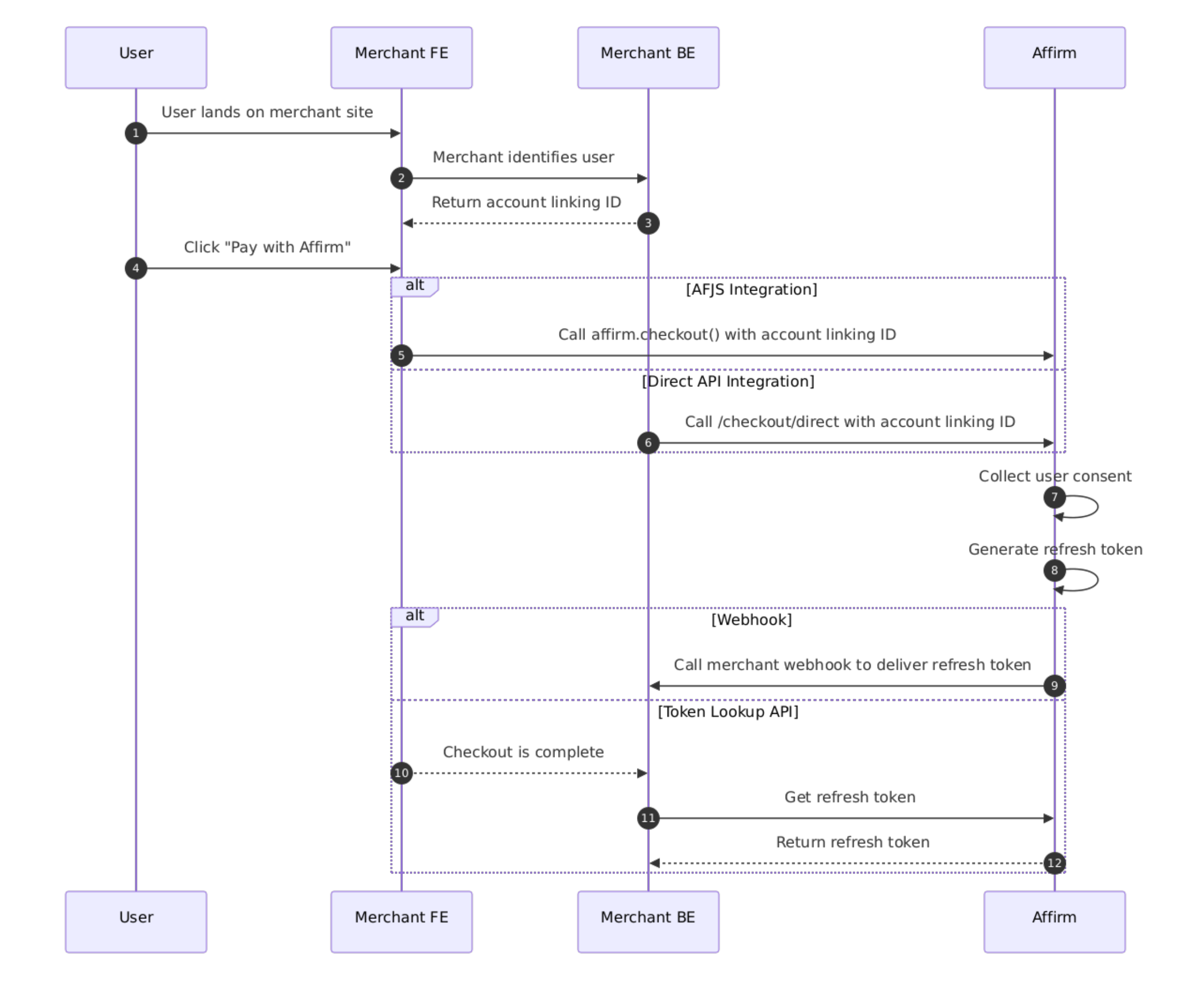
Checkout Creation with Account Linking ID
Affirm.js Integration
Include account_linking_id in your Affirm.js checkout request.
affirm.checkout({
  ...
  account_linking_id: "customer_12345"
});
affirm.checkout.open();| Field | Type | Required | Description |
|---|---|---|---|
account_linking_id | string | Yes, for Connected Accounts only | Your stable customer identifier |
Direct API Integration
Include account_linking.id in your Direct Checkout request. For initial linking, omit access_token and code_challenge.
curl -X POST https://api.affirm.com/api/v2/checkout/direct \
  -u "{public_key}:{private_key}" \
  -H "Content-Type: application/json" \
  -d '{
    ...
    "account_linking": {
      "id": "customer_12345"
    }
}'| Field | Type | Required | Description |
|---|---|---|---|
account_linking.id | string | Yes, for Connected Accounts only | Your stable customer identifier |
Refresh Token Delivery
Webhook delivery is recommended. Use the Token Lookup API only if you do not have webhook infrastructure in place.
| Method | Description |
|---|---|
| Webhook (recommended) | Receive refresh token asynchronously during checkout |
| Token Lookup API | Retrieve refresh token manually after checkout completes |
Webhook (Recommended)
Affirm will send the webhook after the customer has consented and a refresh token has been created.
Requirements
Your webhook endpoint must:
- Be an HTTPS endpoint (HTTP is rejected)
- Respond with 2xx within 30 seconds
- Handle Affirm retrying deliveries for up to 72 hours with exponential backoff
Register Your Webhook Endpoint
To register your webhook endpoint, email your TAM with the following details:
- Your HTTPS endpoint URL
- The account linking event type: linking_status_changed
- The environment you want associated with this endpoint (sandbox, production, or both)
Your TAM will configure the webhook and provide you with a signing secret to verify incoming payloads. Your endpoint must be publicly reachable over HTTPS and respond with a 2xx status code within 30 seconds. Work with your TAM to send a test event to verify delivery before going live.
Payload
{
  "event_type": "linking_status_changed",
  "reference_id": "customer_12345",
  "linked": true,
  "refresh_token": "ref_initial_abc123...",
  "expires_at": 1762257600000,
  "created_at": 1746360000000
}| Field | Type | Description |
|---|---|---|
event_type | string | Always linking_status_changed for new connections |
reference_id | string | Your customer identifier from the checkout request (the account_linking_id) |
linked | boolean | true, when a new link was created |
refresh_token | string | Long-lived token for future authentication |
expires_at | integer | Token expiration, Unix epoch milliseconds |
created_at | integer | Token creation timestamp |
Token Lookup API (Alternative)
You will manually retrieve a refresh token after you have received either the cancel or confirmation callback.
Details
| Property | Value |
|---|---|
| Endpoint | POST /api/pba/v1/oauth/token/lookup |
| Authentication | HTTP Basic Auth
|
| Content-Type | application/json |
Request
curl -X POST https://api.affirm.com/api/pba/v1/oauth/token/lookup \
-u "{public_key}:{private_key}" \
-H "Content-Type: application/json" \
-d '{
  "id": "customer_12345",
  "type": "account_linking"
}'| Field | Type | Required | Description |
|---|---|---|---|
id | string | Yes | Your stable customer identifier (the same account_linking_id passed at checkout creation). |
type | string | Yes | Must be account_linking |
Response
{
  "refresh_token": "ref_initial_abc123...",
  "expires_at": "2026-08-04T12:00:00Z",
  "scope": "checkout",
  "created_at": "2026-02-04T12:00:00Z"
}
| Field | Type | Description |
|---|---|---|
refresh_token | string | Long-lived token for future authentication |
expires_at | string | Token expiration (ISO 8601) |
scope | string | Granted scope, always checkout |
created_at | string | Token creation timestamp |
Returning User Flow
When a recognized user returns to checkout and you have a stored refresh token for them, perform the following steps:
Affirm.js Integration
- Generate the PKCE code challenge and code verifier using
affirm.checkout.prepareAuth(). - Exchange the customer’s stored refresh token for a short-lived access token by calling
/api/pba/v1/oauth/token. - Exchange the access token and code challenge for a session code by calling
/api/pba/v1/oauth/session. - Pass the session code to
affirm.checkout.open().
Direct API Integration
- Generate the PKCE code challenge and code verifier manually using the Web Crypto API.
- Exchange the customer’s stored refresh token for a short-lived access token by calling
/api/pba/v1/oauth/token. - Pass the access token and code challenge at checkout creation and receive a session code.
- Append the session code and code verifier to the checkout redirect URL.
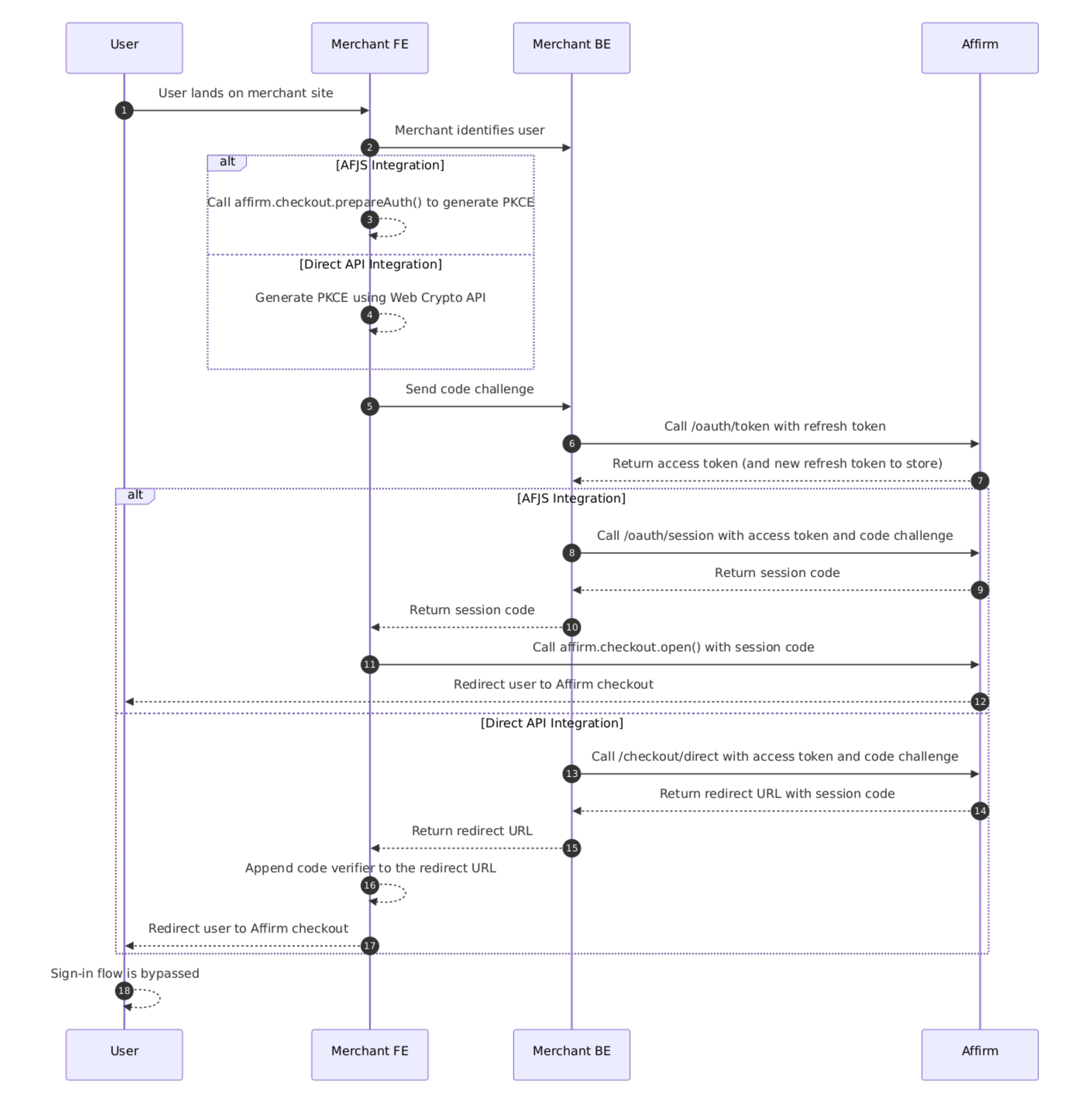
Generate PKCE
Affirm.js Integration
If you use Affirm.js, call affirm.checkout.prepareAuth() to generate the PKCE pair. The SDK handles code verifier generation, SHA-256 hashing, and Base64url encoding internally.
Direct API Integration
If you do not use Affirm.js, generate the PKCE pair yourself using the Web Crypto API.
function generateCodeVerifier() {
  const array = new Uint8Array(32);
  crypto.getRandomValues(array);
  return base64UrlEncode(array);
}

async function generateCodeChallenge(verifier) {
  const encoder = new TextEncoder();
  const data = encoder.encode(verifier);
  const hash = await crypto.subtle.digest('SHA-256', data);
  return base64UrlEncode(new Uint8Array(hash));
}

// Base64url encoding: URL-safe variant of Base64 without padding
function base64UrlEncode(buffer) {
  return btoa(String.fromCharCode(...buffer))
    .replace(/\+/g, '-')
    .replace(/\//g, '_')
    .replace(/=+$/, '');
}
OAuth Token Endpoint
Details
| Property | Value |
|---|---|
| Endpoint | POST /api/pba/v1/oauth/token |
| Authentication | HTTP Basic Auth
|
| Content-Type | application/json |
Request
curl -X POST https://api.affirm.com/api/pba/v1/oauth/token \
  -u "{public_key}:{private_key}" \
  -H "Content-Type: application/json" \
  -d '{
    "grant_type": "refresh_token",
    "refresh_token": "ref_stored_abc123..."
}'| Field | Type | Required | Description |
|---|---|---|---|
grant_type | string | Yes | Must be refresh_token |
refresh_token | string | Yes | The stored refresh token for this customer |
scope | string | No | Defaults to checkout |
Response
{
  "access_token": "at_temp_xyz789...",
  "token_type": "Bearer",
  "expires_in": 900,
  "refresh_token": "ref_new_def456...",
  "scope": "checkout"
}| Field | Type | Description |
|---|---|---|
access_token | string | Short-lived token for checkout. Expires in 15 minutes. |
token_type | string | Always Bearer |
expires_in | integer | Token lifetime in seconds (900 = 15 minutes) |
refresh_token | string | New refresh token. You must store this immediately. |
scope | string | The granted scope |
As described above in Refresh Token Requirements, every token exchange invalidates the previous refresh token. You must:
- Store the new refresh_token immediately upon receiving the response
- Replace the old token in your database
- Never retry with an old refresh token, it will be rejected
Error Codes
| Code | HTTP Status | Description | Action |
|---|---|---|---|
unauthorized | 401 | Refresh token was rejected as invalid (this means the token could be expired, already-used, or revoked) or your API key pair failed authentication. | First, verify your API key pair. If correct, delete the stored refresh token and have the customer re-link. |
invalid_argument | 400 | Request rejected, such as due to a malformed refresh_token | Check request format matches specification. |
internal_server_error | 500 | Unexpected server-side error | Fail open; proceed with standard, non-accelerated checkout. |
OAuth Session Endpoint
Details
| Property | Value |
|---|---|
| Endpoint | POST /api/pba/v1/oauth/session |
| Authentication | HTTP Basic Auth
|
| Content-Type | application/json |
Request
curl -X POST https://api.affirm.com/api/pba/v1/oauth/session \
  -u "{public_key}:{private_key}" \
  -H "Content-Type: application/json" \
  -d '{
    "access_token": "at_temp_xyz789...",
    "code_challenge": "E9Melhoa2OwvFrEMTJguCHaoeK1t8URWbuGJSstw-cM"
}'| Field | Type | Required | Description |
|---|---|---|---|
access_token | string | Yes | The access token from Token Exchange API |
code_challenge | string | Yes | Base64url-encoded SHA-256 hash of code_verifier (generated client-side) |
Response
{
  "session_code": "auth_abc123...",
  "expires_in": 60
}| Field | Type | Description |
|---|---|---|
session_code | string | Single-use code. Valid for 60 seconds. |
expires_in | integer | Code lifetime in seconds |
Error Codes
| Code | HTTP Status | Description | Action |
|---|---|---|---|
unauthorized | 401 | access_token is expired, invalid, or already used, or API key authentication failed | Fail open; proceed with standard, non-accelerated checkout. |
invalid_argument | 400 | Missing or malformed access_token or code_challenge | Check request format matches specification. |
internal_server_error | 500 | Unexpected server-side error | Fail open; proceed with standard, non-accelerated checkout. |
Accelerated Checkout
Affirm.js Integration
Include session_code in your Affirm.js open request.
affirm.checkout.open({
  ...
  session_code: "auth_abc123..."
});
Direct API Integration
Request
Include account_linking.access_token and account_linking.code_challenge in your Direct Checkout request.
curl -X POST https://api.affirm.com/api/v2/checkout/direct \
  -u "{public_key}:{private_key}" \
  -H "Content-Type: application/json" \
  -d '{
    ...
    "account_linking": {
      "id": "customer_12345",
      "access_token": "at_temp_xyz789...",
      "code_challenge": "E9Melhoa2OwvFrEMTJguCHaoeK1t8URWbuGJSstw"
    }
}'| Field | Type | Required | Description |
|---|---|---|---|
account_linking.id | string | Yes, for Connected Accounts only | Your stable customer identifier |
account_linking.access_token | string | Yes, for accelerated checkout | Access token from Token Exchange API |
account_linking.code_challenge | string | Yes, when access_token is provided | PKCE code challenge |
Response with Valid Access Token
If the access token was valid, the redirect URL will contain a session_code.
{
  "checkout_id": "7WYDR0M83CGE47GJ",
  "redirect_url": "https://affirm.com/products/checkout?session_code=eyJ...&checkout_ari=7WYDR0M83CGE47GJ"
}
When you open the redirect URL in the customer’s browser, append the code_verifier:
https://affirm.com/products/checkout?session_code=eyJ...&checkout_ari=7WYDR0M83CGE47GJ&code_verifier=dBjftJeZ4CVP-mB92K27uhbUJU1p1r_wW1gFWFOEjXkResponse with Missing or Invalid Access Token
If the access token was invalid, the redirect URL will not contain a session_code, but will work as normal.
{
  "checkout_id": "7WYDR0M83CGE47GJ",
  "redirect_url": "https://affirm.com/products/checkout?checkout_ari=7WYDR0M83CGE47GJ"
}
Re-Linking & Unlinking
When a Customer Un-Links
A customer can unlink their connected account through Affirm’s user portal or through signing out during checkout. When this happens:
- The refresh token is revoked on Affirm’s side
- The next token exchange you attempt for this user will return
unauthorized - Delete the stored token from your database
- The customer is able to complete Affirm's standard authentication flow at checkout
You can also remove a customer’s connection from your side by deleting their refresh token from your database. There is no API call required to notify Affirm, the token will simply expire unused.
When a Customer Re-Links
If a previously unlinked customer opts in to “Keep me signed in” on a subsequent checkout, Affirm creates a new refresh token and delivers it via webhook or the Token Lookup API. Store the new token using the same account_linking_id. The flow is identical to the initial linking process.
Updated 2 months ago