
Add Promotional Messaging to SFCC
Learn about adding Affirm promotional messaging to your Salesforce Commerce Cloud (SFCC) platform.
Country Availability
 USA
USA
 Canada
Prerequisites
Steps
- In the Business Manager, go to Merchant Tools > Site Preferences > Custom Site Preferences > Affirm.
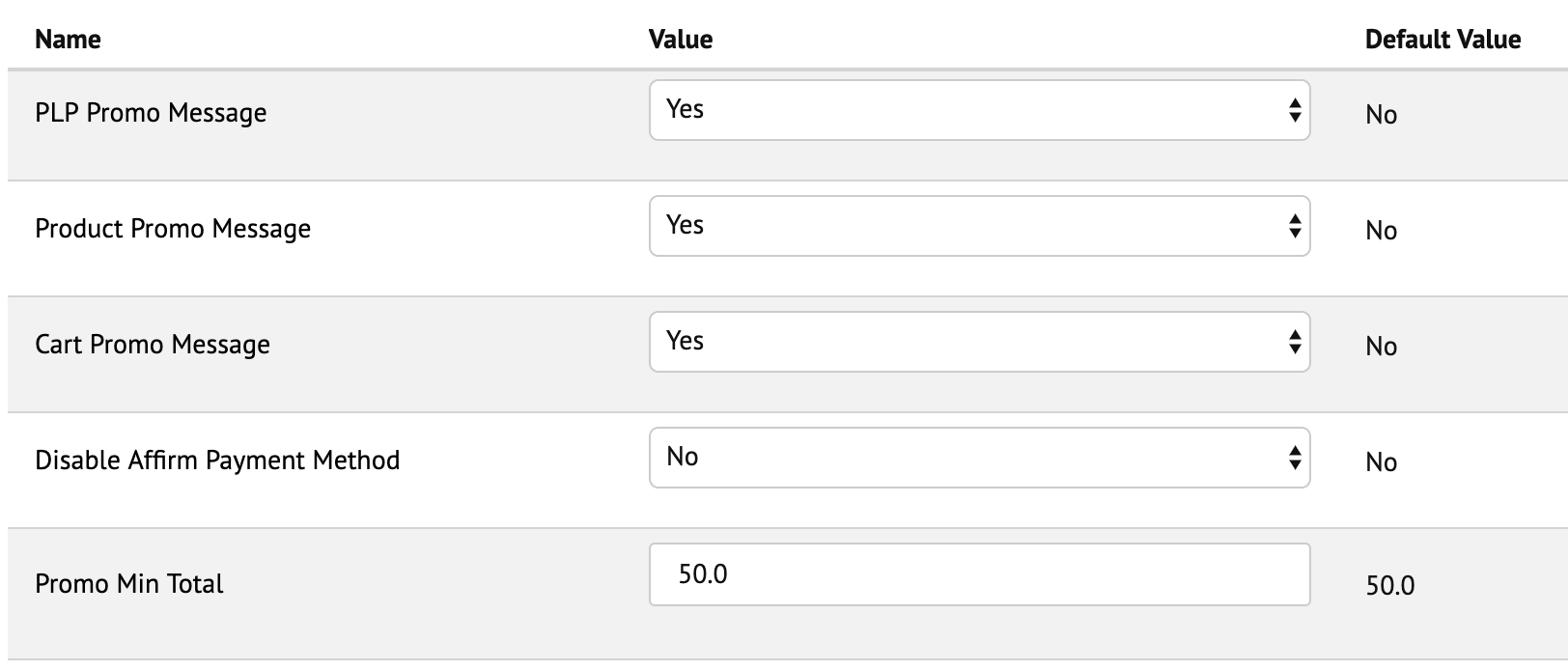
- Set the following options to Yes:
- Product Promo Message. Displays messaging on product pages.
- PLP Promo Message. Displays messaging on category pages.
- Cart Promo Message. Displays messaging on cart page.
- Enter a Promo Min Total value to set the minimum threshold dollar amount that displays monthly payment messaging (e.g., setting the Promo Min Total to 100 only displays monthly payment messaging for products above $100).
- (Optional) If the Affirm team has provided you with a Promo ID, you can enter a Promo ID value to customize messaging (prepend the Promo ID value with
default|data-promo-idand set Default financing program to default). If you don’t have a Promo ID, leave all the Financing Program fields blank.
What's next?
Updated 7 months ago
Did this page help you?