
Finalize a Card
Use Affirm's Card API finalize request to refund the remaining unused balance on the virtual card.
Overview
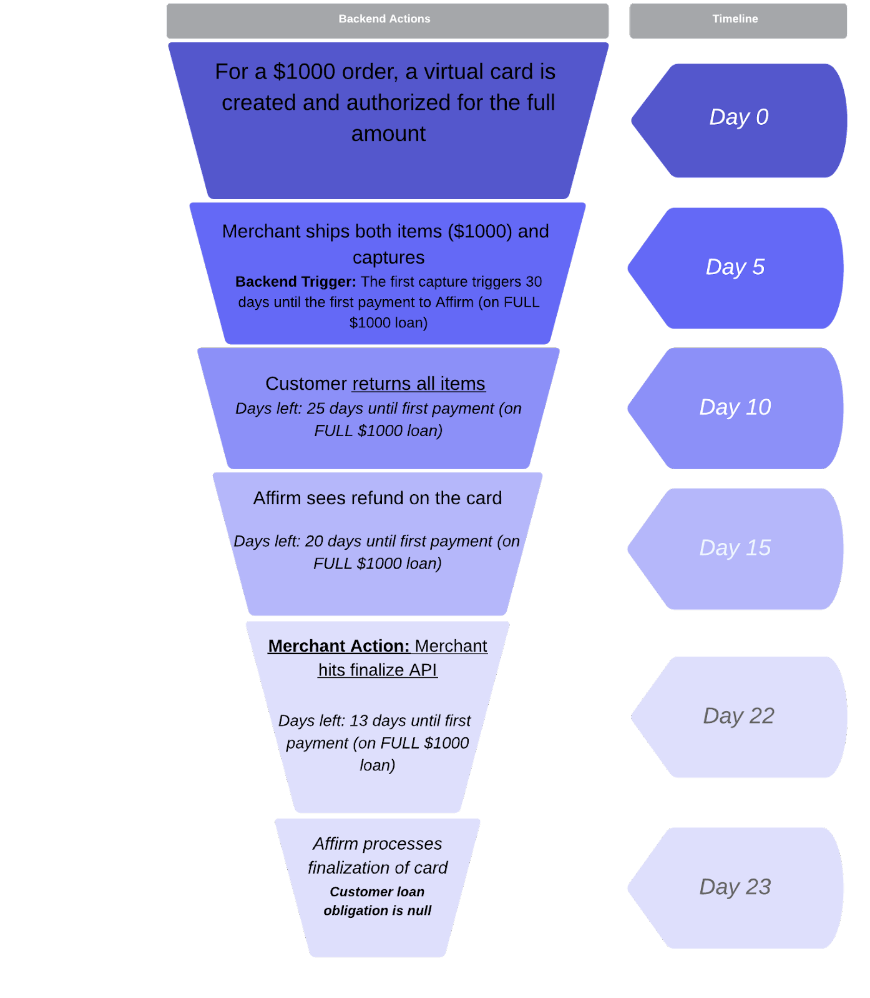
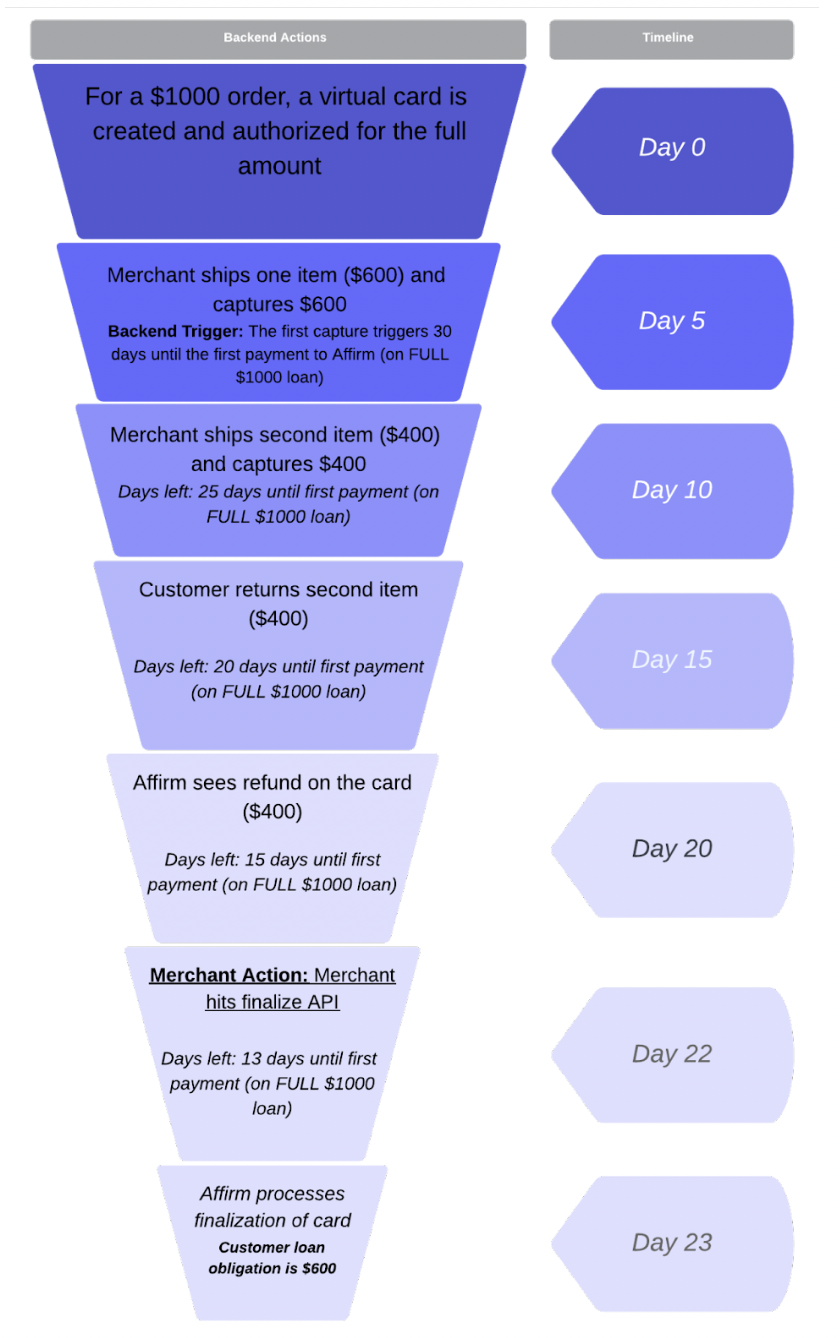
The Finalize API is an affirmative signal to Affirm that you’re done performing actions on the virtual card. The Finalize a Card endpoint resolves an authorized or captured loan down to the amount that has been captured on the Affirm virtual card at the moment of the API request execution. If funds:
- Haven’t been captured, the loan is voided/canceled.
- Have been captured, the loan is refunded down to the amount that’s outstanding, including a full refund if the card has been fully refunded.
If you’re unsure if this applies to your business, contact us via the support widget.
Timely refundsWhen a merchant doesn’t capture the authorized loan amount from a virtual card in full or when they issue a partial refund, Affirm waits through the authorization window (45 days by default) for the merchant to resolve open authorizations. As a result, the customer must also wait through the full authorization window before receiving their refund.
To ensure that your customers receive timely refunds, we recommend executing a Finalize API request on a virtual card at least one week after the last anticipated capture is submitted to the card.
Implementation
1. Verify everything has been captured on the card.
If you don’t intend to complete further authorizations or captures on a card, send a request to the Finalize API at least one week after you capture all existing authorizations.
When there’s an order cancellation, verify that everything has been captured on the card, even if it’s lower than the order total. If you still want to capture on the card, don’t hit the Finalize API yet. Call the Finalize API only after you’re done capturing.
NoteAfter you finalize a virtual card, it can’t accept further authorizations or captures. The only event Affirm expects after the card has been finalized is a refund.
2. [Example] Run a query to return orders that need to be finalized.
Lookback orders where the last capture occurred 7 days prior:
SELECT order_id, transaction_id FROM customer_orders
WHERE payment_type = 'Affirm'
AND order_status = 'fully captured' -- check notes below on order status
AND finalized_status = 0
AND last_capture_date <= DATEADD(day, -7,  current_date)
Note onorder_status:The exact definition of a “fully captured” order depends on your business logic. The core idea is that there are no funds remaining to be captured for the order.
Example: This would both count for “happy path” orders where 100% of the funds are captured and partial cancellations where 60% was captured, and the remaining 40% was canceled. In this case, 100% of the funds that need to be captured are already captured, so the Finalize API can be hit.
3. Call the Finalize API.
With the Affirm checkout ID’s associated to the orders, make a POST call to our Finalize endpoint:
https://api.affirm.com/api/v2/cards/{checkout_id}/finalize
Example of a successful response:
{
  "message": "The card was successfully scheduled to finalize. You should see changes reflected in 24 hours.",
  "code": "success",
  "checkout_token": "FA0UUFRGOND84S7C"
}
Order Flow Diagrams
Multi-item Full Refund
Multi-item Partial Refund
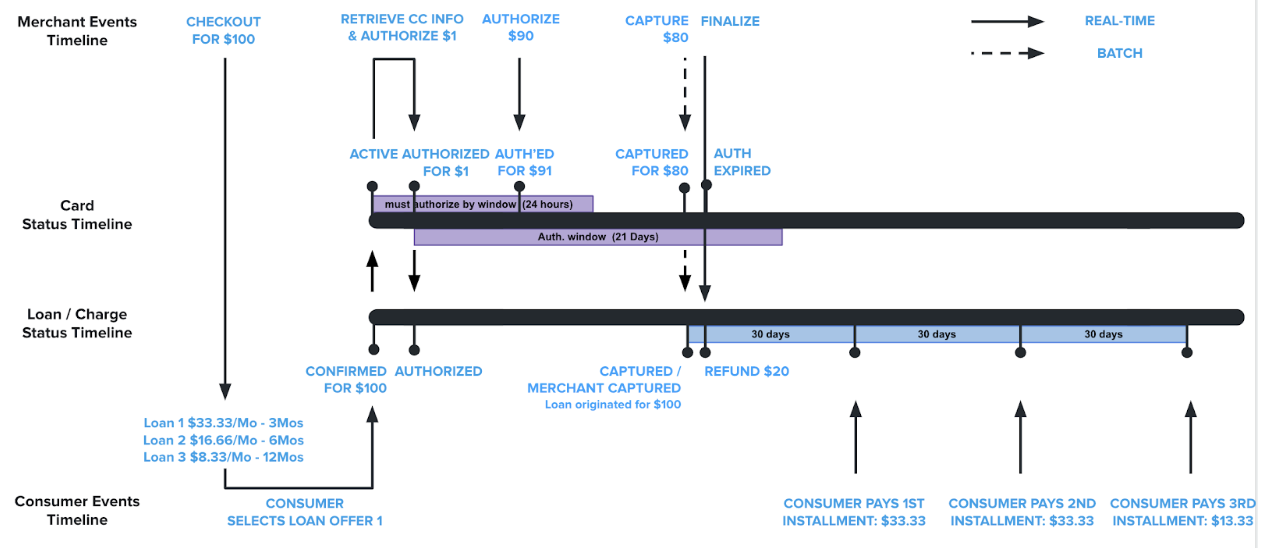
Timeline
Successful responseWhen a confirmation response is received, the customer's loan is partially or fully refunded.
- If the card is in expired, canceled, or auth_expired, do nothing.
- If the card is confirmed, expire the card and cancel the charge.
- If the card is authorized, auth expire the card and void the charge.
- If the card is in captured province, auth expire the card and refund the charge to the balance that is currently captured on the card.
Once the scheduled event is executed, this will either remove the loan from the customer's Affirm user portal or refund and update the payment schedule for the loan to the appropriate amount.
Bad request
- The merchant is not a Platforms.vcn merchant.
- There is no checkout token with that
checkout_token.- There is no card associated with the
checkout_token.- The current agent does not have update permission on the charge (wrong merchant).
- The charge is being disputed.
- The card state is not being handled (should never happen unless we add a new
CardState).
Production EnvironmentOnly practically available in the production environment. Needs to hit the payment rails.
Recommended Topics
Updated 8 months ago