
About Express Checkout
Affirm Express Checkout is an Affirm-hosted checkout solution that streamlines the purchase flow by collecting shipping and total order details directly within Affirm.
Country Availability
 USA
USA
Interested in offering Affirm Express Checkout?
Reach out to your Affirm Account Manager to confirm availability and for next steps on building your APIs.
Overview
Affirm Express Checkout is an Affirm-hosted checkout experience that manages the entire purchasing journey, from initiation to completion, while saving shoppers time by pre-populating personal details. It enables shoppers to initiate checkout directly from a product page, cart, or other entry point without requiring the final order total or shipping address upfront. Affirm collects the shipping address, presents shipping options, calculates totals, and returns the finalized checkout details to the merchant for post-loan confirmation.
Regional availability
Affirm Express Checkout is currently only available for merchants and customers located within the United States.
- Supported Currency: All transactions must be processed in USD.
- Supported Regions: The customer's shipping address must be a valid US address.
- Shipping Restrictions: If your business does not ship to specific US regions (e.g., Hawaii or Alaska), you must handle this using the
UNSUPPORTED_SHIPPING_ZONEerror code in your Shipping & Totals HTTP Endpoint.
The Customer Experience
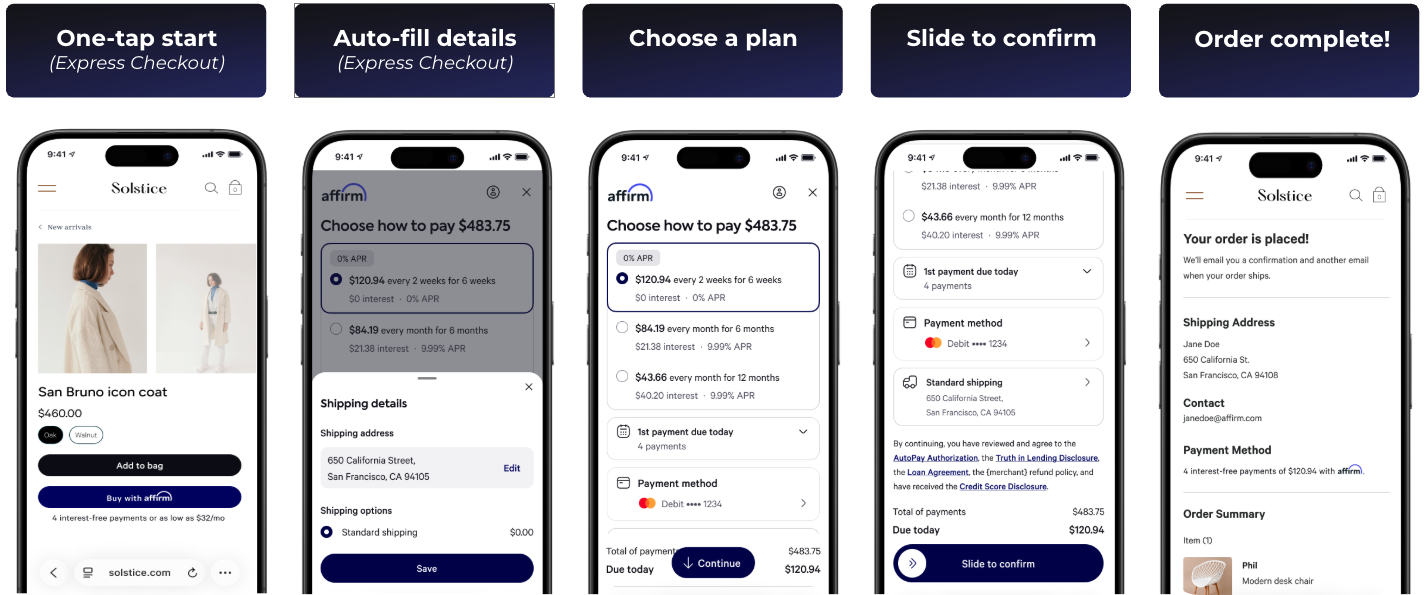
With Express Checkout, the shopper begins their purchase by clicking an Affirm Express Checkout button on a product page, cart page, checkout page, or other supported surface. From there, the checkout experience is fully hosted by Affirm.
- One-tap start: Shoppers select Affirm Express Checkout directly from the product or cart page to begin checkout instantly.
- Auto-fill details: Affirm securely collects and auto-fills shipping information, allowing customers to review and select available shipping options.
- Choose a plan: Customers view their total purchase amount and choose a preferred payment plan with transparent monthly or bi-weekly options.
- Slide to confirm: Customers confirm their purchase by sliding to finalize the loan and checkout within the Affirm experience.
- Order complete: Customers are returned to the merchant’s site with a confirmation screen showing order details, shipping information, and payment summary.
The Merchant Experience
Express Checkout is an extension of Affirm’s Direct API integration and requires an existing Direct API implementation. It simplifies the traditional checkout flow by shifting key steps into Affirm’s hosted experience.
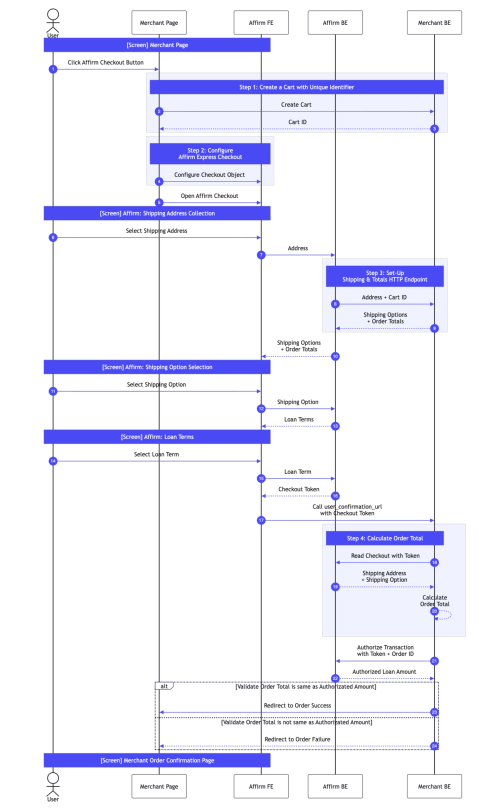
- Generate a Cart with a unique ID: Create a unique identifier to track the checkout session.
- Configure Affirm Express Checkout: Configure and launch affirm.checkout with checkout_variant: "express", including items and subtotal (omit shipping and total).
- Set-up Shipping & Totals endpoint: Provide a server-side endpoint that accepts order_id, currency, and shipping address, and returns the shipping options that should be offered along with their associated amounts.
- Calculate Order Total: Retrieve the completed checkout details from Affirm and calculate the final order total in your backend for validation.
- (Optional) Add the Affirm Checkout button: Place the Affirm Express Checkout button on your product, cart, or other supported pages to enable shoppers to launch the Express Checkout flow.
The diagram below illustrates the Affirm Express Checkout flow, highlighting key expectations:
Recommended Topics
Updated 2 months ago