
Authorize and Capture Transactions
Découvrez comment fonctionne le processus d'autorisation et de capture d'Affirm. Autorisez une transaction pour réserver des fonds et générer un identifiant unique, puis capturez-la pour régler les fonds et finaliser le paiement. Prend en charge à la fois les captures complètes et partielles.
Disponibilité des pays
 USA
USA
 Canada
 UK
UK
Autoriser la transaction
L’autorisation d’une transaction a lieu après que l’utilisateur a terminé avec succès le processus de caisse Affirm et est retourné sur le site du commerçant. Le point de terminaison Autoriser la transaction crée un prêt et réserve les fonds. Vous devez autoriser une transaction avant de la capturer.
Lorsque vous autorisez une transaction, Affirm génère un id unique que vous pouvez utiliser pour faire référence au prêt à l'avenir.
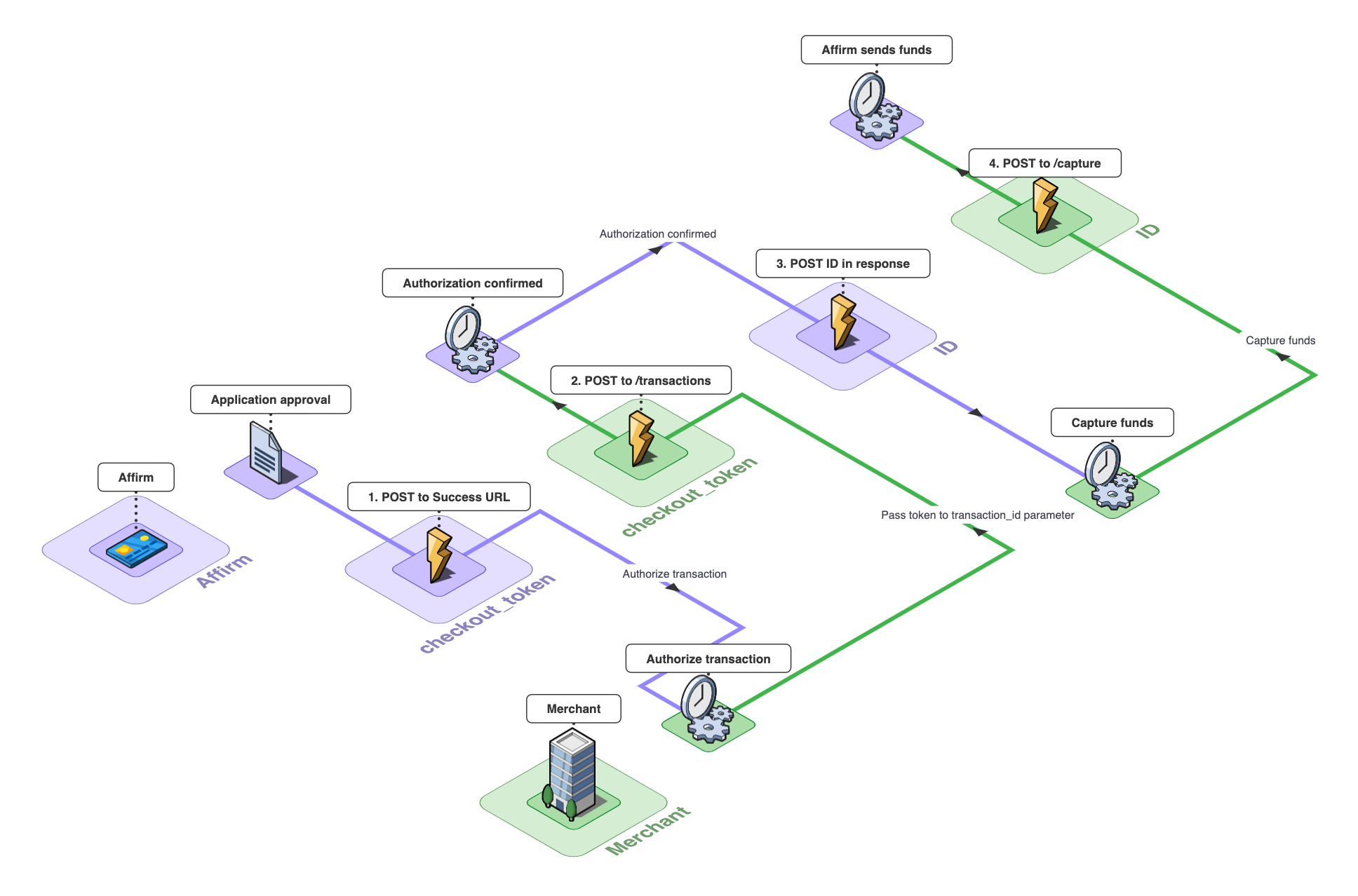
Cela représente le flux d'autorisation et de capture.
Si vous n'autorisez pas une transaction, celle-ci n'est pas considérée comme active. Cela signifie que l’utilisateur ne peut pas voir le prêt et que vous ne pouvez pas capturer les fonds. Pour cette raison, vous devez autoriser le prêt dès que vous recevez un
checkout_token.
Pour autoriser une transaction, vous avez besoin du checkout_token retourné par votre intégration de caisse pour le transmettre au paramètre transaction_id.
curl https://sandbox.affirm.com/api/v1/transactions
     -X POST
     -u "{public_api_key}:{private_api_key}"
     -H "Content-Type: application/json"
     -d '{"transaction_id": "{checkout_token}","order_id": "{order_id}"}'
$endpoint = "https://sandbox.affirm.com/api/v1/transactions";
$data = '{"transaction_id": "' . $_POST["transactions_id"] . '"}';
try {
$response = callAffirm($endpoint, $data);
// Handle the response
} catch (Exception $e) {
// Handle the exception
}using(var httpClient = new HttpClient()) {
using(var request = new HttpRequestMessage(new HttpMethod("POST"), "https://sandbox.affirm.com/api/v1/transactions")) {
var base64authorization = Convert.ToBase64String(Encoding.ASCII.GetBytes("<public_api_key>:<private_api_key>"));
request.Headers.TryAddWithoutValidation("Authorization", $ "Basic {base64authorization}");
request.Content = new StringContent("{\"transaction_id\":\"<checkout_token>\"}");
request.Content.Headers.ContentType = MediaTypeHeaderValue.Parse("application/json");
var response = await httpClient.SendAsync(request);
HttpContent responseContent = response.Content;
using(var reader = new StreamReader(await responseContent.ReadAsStreamAsync())) {
Console.WriteLine(await reader.ReadToEndAsync());
}
Console.ReadKey();
}
}Vous devriez recevoir une réponse contenant un identifiant unique (« AMLC-5X0W » dans cet exemple).
{
    "status": "authorized",
    "amount_refunded": 0,
    "provider_id": 1,
    "created": "2021-06-23T23:25:55Z",
    "order_id": "ABC123",
    "checkout_id": "7WYDR0M83CGE47GJ",
    "currency": "USD",
    "amount": 49999,
    "events": [
        {
            "currency": "USD",
            "amount": 49999,
            "type": "auth",
            "id": "7WYDR0M83CGE47GJ",
            "created": "2021-06-23T23:26:28Z"
        }
    ],
    "remove_tax": false,
    "authorization_expiration": "2021-07-23T23:26:28Z",
    "id": "AMLC-5X0W"
}
Une fois que vous avez autorisé une transaction et reçu l'objet de réponse, votre site doit effectuer les opérations suivantes :
- Valider que le montant autorisé est égal au total de la commande
- Stockez le
id(identifiant de transaction). - Marquez le paiement de la commande comme étant en attente.
Si l'autorisation échoue, votre site peut potentiellement enregistrer cette tentative de paiement, car elle n'est pas requise de notre côté.
Lignes directrices sur l'autorisationAutorisez chaque prêt Affirm une seule fois pour le montant total de la transaction en cours d'achat. Si vous avez un cas d'utilisation spécifique où cela peut être difficile, veuillez communiquer avec nous à l'adresse [email protected] ou utiliser le widget au bas de la page.
Capturer une transaction
Après qu’une commande a été traitée, vous devez envoyer une requête de capture de transaction à Affirm afin de capturer ou de régler les fonds. Effectuez cette activité à partir de vos systèmes dorsaux sécurisés. Pour capturer une transaction autorisée, vous avez besoin du id fourni dans la réponse APIAuthorization. Il n’y a pas de champs obligatoires à stocker à partir de la réponse id .
La capture des fonds est similaire à celle d'une transaction par carte de crédit. Après avoir saisi le prêt, voici ce qui se produit :
- Affirm informe le client que le prêt a été saisi et que son premier paiement est dû à Affirm dans 30 jours (pour les mensualités) ou dans 2 semaines (pour Pay in 4), ou tout autre échéancier de paiement.
- Affirm paie le commerçant dans les 2 à 3 jours ouvrables par virement ACH vers le compte bancaire fourni.
curl https://sandbox.affirm.com/api/v1/transactions/{id}/capture
     -X POST
     -u {public_api_key}:{private_api_key}"
     -H "Content-Type: application/json"
     -d '{"order_id": "{order_id}", "shipping_carrier": "USPS", "shipping_confirmation": "1Z23223", "amount":49999}'
$endpoint = "https://sandbox.affirm.com/api/v1/transactions";
$url = $endpoint . "/" . $_GET["id"] . "/capture";
$data = '';
try {
$response = callAffirm($url, $data);
// Handle the response
} catch (Exception $e) {
// Handle the exception
Capture partielleVous pouvez effectuer une capture partielle en spécifiant une valeur en cents dans le paramètre
amount.
La somme cumulée des montants de capture partielle ne peut pas dépasser le total initialement autorisé.
Vous recevez ensuite une réponse avec la confirmation.
{
    "fee": 1500,
    "created": "2021-06-23T23:27:13Z",
    "order_id": "ABC123",
    "currency": "USD",
    "amount": 49999,
    "reference_id": "6789",
    "type": "capture",
    "id": "7WYDR0M83CGE47GJ"
}
Mis à jour 8 months ago