
Modal vs Redirect Checkout
Learn about Affirm's Modal and Redirect checkout options. Modal checkout keeps users on your site with a pop-up, while Redirect takes them to Affirm’s site for authentication. Configure metadata, define callback functions, and test your integration for a seamless payment flow.
Country Availability
 USA
USA
 Canada
Overview
Affirm enables your customers to go through the Affirm loan application flow using our Modal or Redirect checkout.
Modal
Users go through the Affirm flow in a modal while remaining on your site. Modal checkout also enables client-side callbacks so that you can receive confirmation checkout from affirm.js instead of HTTP.
Redirect
Users are redirected to Affirm's site, where they authenticate and go through the checkout flow. Once they complete checkout, they're returned to the merchant site.
Modal Checkout
- Add a metadata flag to your checkout object.
- Define callback functions (optional).
Add a Metadata Flag to Your Checkout Object
Enable modal checkout by adding a new parameter to the checkout object metadata.
{
    ...,
      "metadata": {
        "mode":        "modal"
      },
    ...
}
Fashion
optional enum. Set to modal to enable the modal checkout flow (default uses redirect checkout flow).
Define Callback Functions (optional)
The affirm.checkout.open() function accepts an argument object where you can define success and failure callback functions.
{
    onFail: function(){yourAffirmCancelFunction()},
    onSuccess: function(success_object){yourAffirmSuccessFunction(success_object)},
    onOpen: function(){yourAffirmOpenFunction()},
    onValidationError: function(){yourAffirmCheckoutValidationFunction()}
}
onFail
optional function. Called when the customer exits, cancels, or is declined in the Affirm checkout flow.
onSuccess
optional function. Called when the customer confirms their Affirm loan. Receives success_object, which contains the checkout_token.
onOpen
optional function. Called when the customer successfully loads the Affirm checkout flow.
onValidationError
optional function. Called when there was a validation error with the checkout request submitted.
Test Modal Checkout
After implementing modal checkout, call affirm.checkout.open(). The modal checkout flow appears in a lightbox modal above your page contents. Use the the following code to test your modal checkout.
affirm.checkout.open({
    onFail: function(){
       console.log("User cancelled the Affirm checkout flow")},
    onSuccess: function(a){
       console.log("Affirm checkout successful, checkout token is: " + a.checkout_token)},
    onOpen: function(token){
       console.log("Affirm modal was opened successfully, checkout token is: " + token)},
    onValidationError: function(a) {
      console.log("onValidationError, respond to bad data here", a)}
});
Example Code
Example Checkout Object
affirm.checkout({

      "merchant": {
        "user_confirmation_url": "https://merchantsite.com/confirm",
        "user_cancel_url": "https://merchantsite.com/cancel",
        "user_confirmation_url_action": "POST",
        "name": "Your Customer-Facing Merchant Name"
      },
      "shipping":{
        "name":{
          "first":"Joe",
          "last":"Doe"
        },
        "address":{
          "line1":"633 Folsom St",
          "line2":"Floor 7",
          "city":"San Francisco",
          "state":"CA",
          "zipcode":"94107",
          "country":"USA"
        },
        "phone_number": "4153334567",
        "email": "[email protected]"
      },
      "billing":{
        "name":{
          "first":"Joe",
          "last":"Doe"
        },
        "address":{
          "line1":"633 Folsom St",
          "line2":"Floor 7",
          "city":"San Francisco",
          "state":"CA",
          "zipcode":"94107",
          "country":"USA"
        },
        "phone_number": "4153334567",
        "email": "[email protected]"
      },
      "items": [{
        "display_name":         "Awesome Pants",
        "sku":                  "ABC-123",
        "unit_price":           1999,
        "qty":                  3,
        "item_image_url":       "http://merchantsite.com/images/awesome-pants.jpg",
        "item_url":             "http://merchantsite.com/products/awesome-pants.html",
        "categories": [
            ["Home", "Bedroom"],
            ["Home", "Furniture", "Bed"]
        ]
      }
   ],
      "discounts":{
         "RETURN5":{
            "discount_amount":500,
            "discount_display_name":"Returning customer 5% discount"
        },
        "PRESDAY10":{
            "discount_amount":1000,
            "discount_display_name":"President's Day 10% off"
      }
   },
   "metadata":{
      "shipping_type":"UPS Ground",
      "mode":"modal"
   },
   "order_id":"JKLMO4321",
   "currency":"USD",
   "financing_program":"flyus_3z6r12r",
   "shipping_amount":1000,
   "tax_amount":500,
   "total":100000
});

affirm.checkout.open();
Appendix
Third-party Cookies
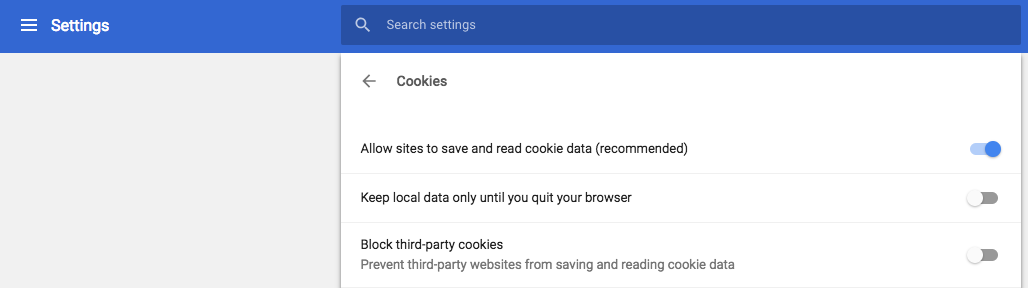
The modal checkout experience will be degraded if third-party cookies are not allowed and disabled within a browser's privacy and security settings. If third-party cookies are disabled, the Affirm checkout flow will always be modal and require users to re-authenticate even if the "Remember my device" option is selected.
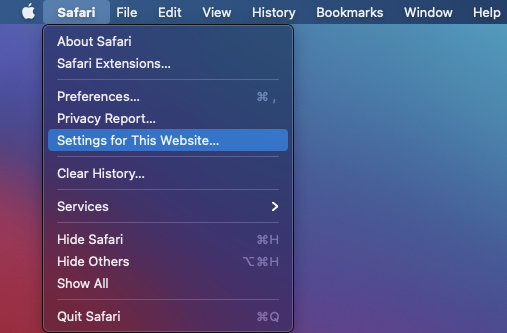
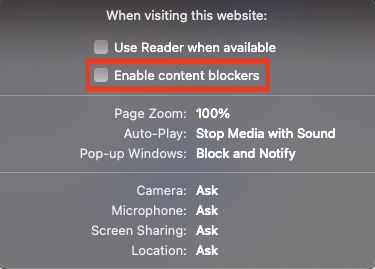
To allow third-party cookies, please follow the guides below for Google Chrome and Safari browsers.
Chrome
Go to Preferences > Advanced > Content Settings > Cookies.
Safari
1. Go to Safari > Settings for This Website... .
2. Uncheck Enable content blockers.
Updated 11 months ago