

Render the hosted checkout
Render Affirm's hosted checkout on your web, iOS or Android application.
How it works
This diagram shows how your client, your server and Affirm interact:
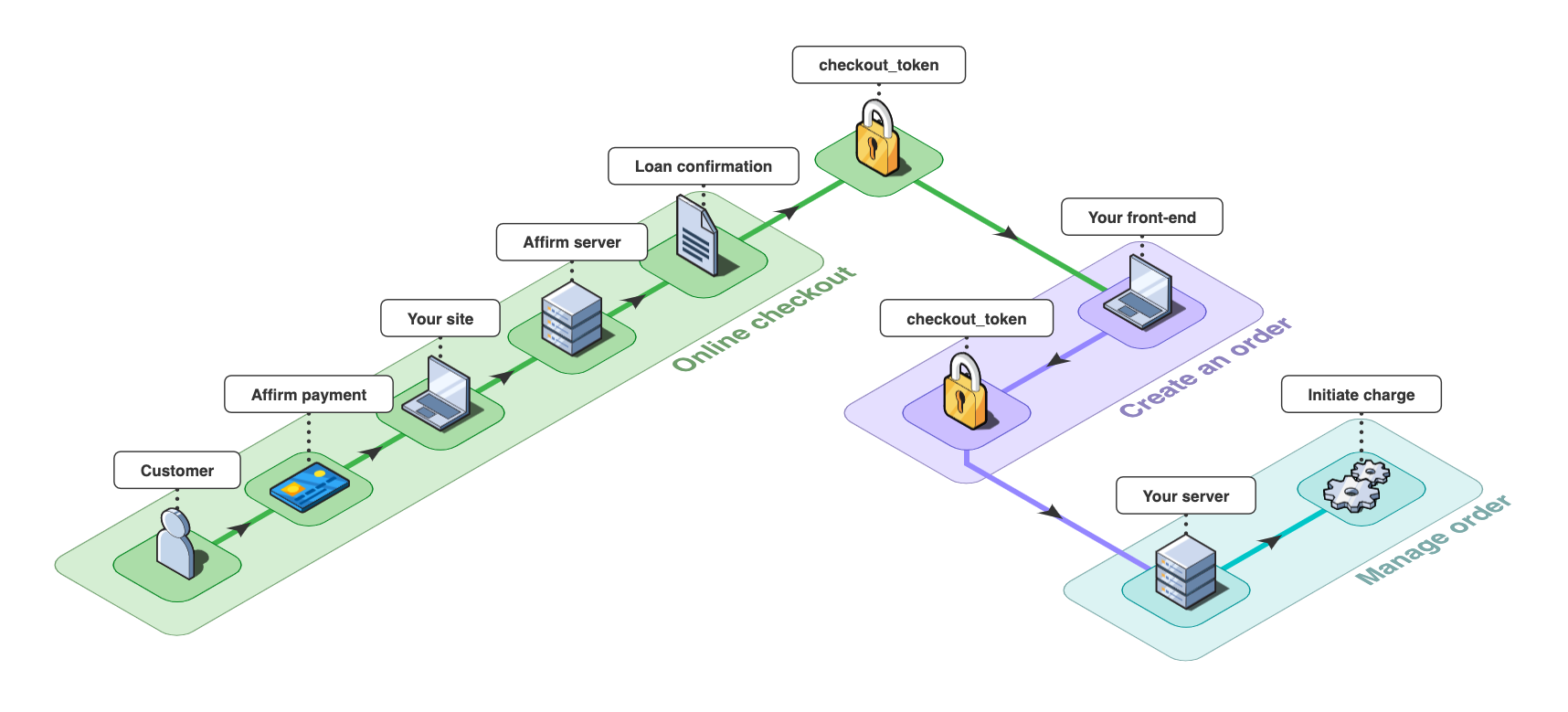
Affirm checkout flow
This schema is relevant for any client-side integration via web or mobile.
1. Online checkout
- The customer and merchant submit the order information
- The client communicates that information to Affirm
- Affirm renders the checkout experience and on loan confirmation by the customer and returns a
checkout_token.
2. Create an order
Your front-end sends the checkout_token to your server (via POST, GET or a Webhook).
3. Manage order
Your server code receives the checkout_token and then uses it to initiate a charge.
Affirm's checkoutAffirm will host the full checkout experience based on the request details. For web, use
Affirm.js. For mobile, use iOS and/or Android SDKs.Click here to view the full end-to-end Affirm transaction flow.
Updated 11 months ago
Related topics
Ready to collect customer details? Choose your platform to collect, request and tokenise your customer details.
Did this page help you?